ScreenSync Platform — One Catalog, Four Surfaces, Zero Cloud
The whole ScreenSync system: Flutter capture app, Node hub, 57-tool MCP server, MV3 browser extension and a static product site — all self-hosted, all reading from one shared tool catalog.
- Client
- EpsolDev
- Category
- Platform Engineering
- Completed
- 2026-09-02
- Built with
- Flutter, Node.js, TypeScript, Express.js, REST API, SQLite, Git, GitHub
- Topics
- API Development, Automation, DevOps
Platform Engineering
ScreenSync is not one tool. It is a system that gives an AI agent a body — eyes on a real Android screen, hands on a real browser tab, a hub that indexes everything it sees, and a public product site that documents and distributes the whole thing.
This entry covers the platform as a whole: how the pieces fit, what the shared contract between them is, and how the product site was built to serve humans and the agents that increasingly read documentation on a human's behalf.
Four deliverables shipped as one coherent platform — Flutter capture app, Node/TypeScript hub, MCP server with 57 tools, MV3 browser extension — plus the product website and a self-hosted distribution channel.
The system in one picture
Android device (Flutter capture app)
        |  MediaProjection frames
        v
   ScreenSync Hub (Node.js + Express + SSE)
        |  indexed frames, device state, web frames
        |---> MCP server (stdio JSON-RPC) ---> Claude / Cursor / Qoder / CI
        +---> Browser extension (MV3)       ---> the developer's real tabs
Nothing in that chain crosses a third-party cloud. The hub runs on the developer's machine or a box on their LAN, advertises itself as _screensync-hub._tcp over mDNS, and pairs with a token.
The contract that holds it together
The most important design decision in ScreenSync is that there is one catalog. A single module defines every tool the platform exposes, and three consumers read from it:
- The MCP stdio handlers, so an agent sees the real tool list on
tools/list - The HTTP
/api/mcp/catalogendpoint, so the Flutter app and the extension can render the same tool surface in their own UIs - The
get_mcp_catalogtool itself, so an agent can introspect its own capabilities without leaving the conversation
That eliminates an entire class of bug — a UI promising a tool the server never implemented, or a server implementing one nobody can discover. The catalog browser in the extension and the tool list in the app dashboard are literally the same data.
The four surfaces
The Android app is the truth source. It holds the MediaProjection consent, runs a foreground service so the user always knows capture is active, and pushes real frames to the hub. It is also the human's control panel: live device list, capture gallery, telemetry, diagnostics and settings.
The browser extension extends the same idea to the web. Instead of a virtual display it uses a content-script plus CDP hybrid to reach the real tab — sessions, cookies, other extensions and service-worker state intact. It adds web_perf_audit and accessibility_audit as first-class tools.
The MCP server is the boundary. stdio JSON-RPC means no open ports, no leaked credentials, and compatibility with every MCP host. Version 2.7.0 of screensync-mcp-server groups 57 tools into capture, control, inspection, autonomous flows, OS desktop automation and the web suite.
The hub is the join. Express for the HTTP surface, SSE for push, SQLite for frame indexing, mDNS for discovery.
| Surface | Role | Truth it provides |
|---|---|---|
| Flutter app | Capture and human control panel | What the user actually sees on the phone |
| Node hub | Index, transport, discovery | History, device state, fan-out |
| MCP server | Agent boundary | A typed, introspectable tool catalog |
| MV3 extension | Browser actuator | The real logged-in web session |
The product site
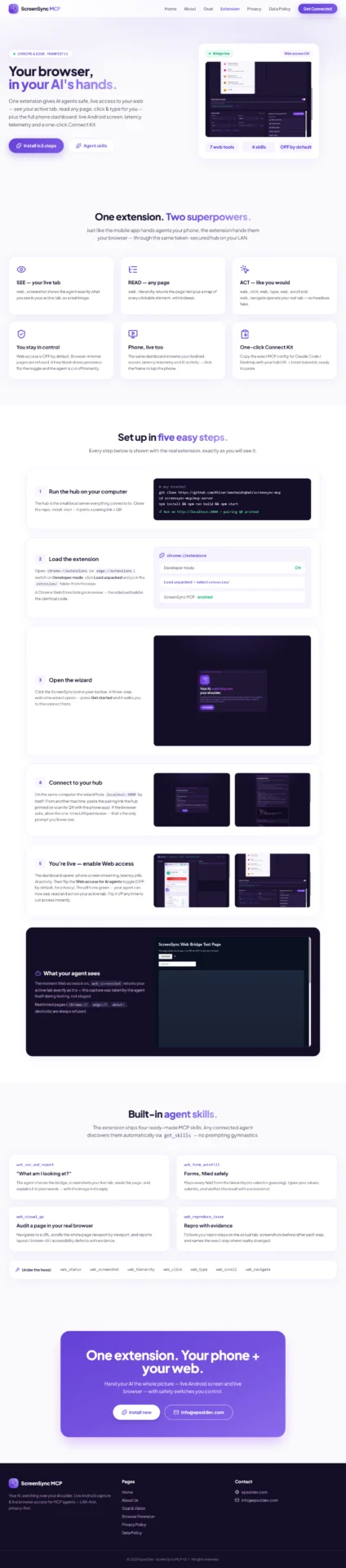
https://screensyncmcp.epsoldev.com/ is the distribution and documentation surface. It was built against an unusual constraint: it has to work for a crawler with JavaScript disabled, because a large share of its real traffic is agents fetching documentation on a developer's behalf.
That drove several decisions:
- Server-rendered static HTML — index, extension, about, goal, privacy and data-policy pages
- A
setup-guide.jsondata file so the onboarding steps are machine-readable as well as visual - Real annotated screenshots for every setup step, including the
chrome://extensions"Load unpacked" flow, instead of illustrations sitemap.xmlandrobots.txtmaintained explicitly- Zips served straight from the site —
downloads/screensync-hub.zipanddownloads/screensync-extension.zip— so self-hosting needs no package registry - Responsive down to 390px, verified on the extension page at both 1280px and phone width
- Deployed from a dedicated
deploybranch, keeping the published artifact separate from the working tree so the repo can churn while the public site stays stable
And this portfolio itself
The pages you are reading are served by EpsolDev Management, the headless WordPress backend behind this site. These three ScreenSync case studies were written, illustrated and published through that backend's own MCP server.
Meta The screenshots in these case studies were captured by ScreenSync, uploaded through EPD's MCP media pipeline, and the records themselves were created by an agent calling portfolio_create. The tooling documented here was used to publish the documentation.
Results
- One shared catalog across four surfaces — no drift between what is implemented and what is advertised
- Real-device and real-browser ground truth for any MCP client, fully self-hosted
- mDNS discovery plus token pairing: a new device or browser joins in seconds
- A product site that serves humans, crawlers and agents from the same static HTML
- Distribution without a registry — hub and extension ship as zips from the site
References
- Product site: https://screensyncmcp.epsoldev.com/
- Extension page: https://screensyncmcp.epsoldev.com/extension.html
- Platform source: https://github.com/KhizarJamshaidIqbal/screensync-mcp
- Extension source: https://github.com/KhizarJamshaidIqbal/screensync-extension
Deep dives: ScreenSync MCP · ScreenSync Browser Extension